Guide
Every setting, how the numbers are worked out, the plan code, and what the research behind ULTRA RACE found. Change settings in the Connect IQ app (ULTRA RACE › Settings).
Your numbers beat any default. If you have a coach, a sweat test or a fuelling plan you trained with, use those.
Plan
| Setting | Default | Guidance |
|---|---|---|
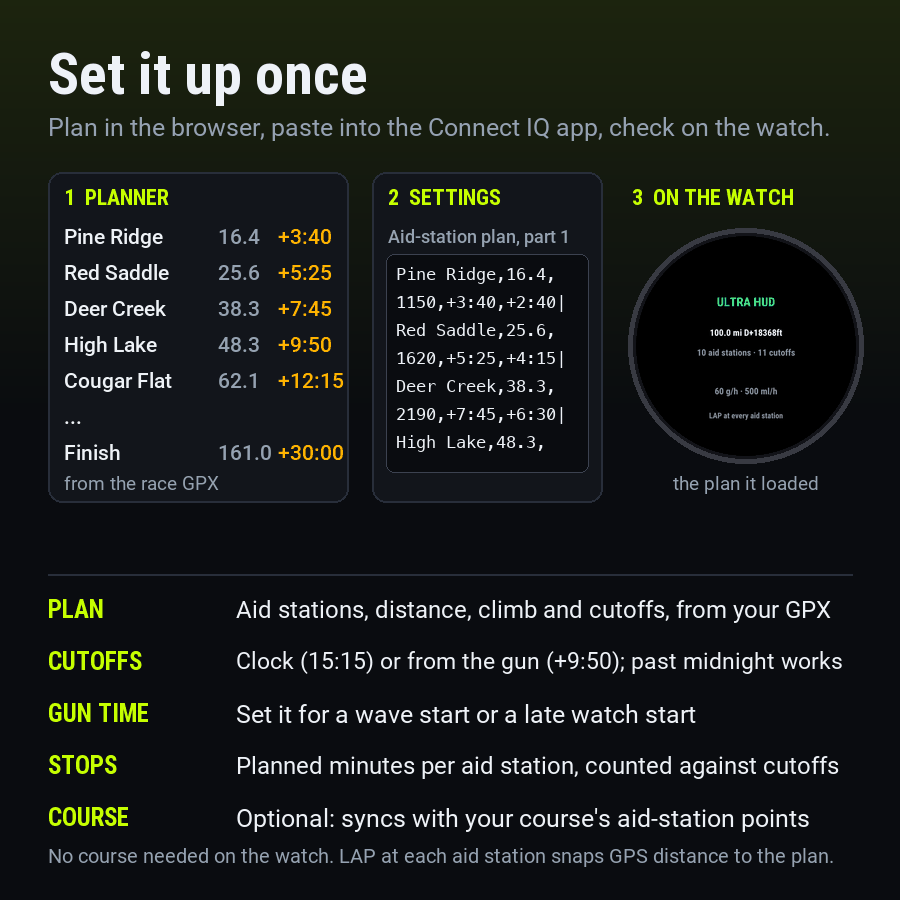
| Aid-station plan, parts 1 to 8 | Empty | The code from the planner, pasted part by part. Most races fit in two to four parts; parts 5 to 8 are for long 200-mile plans. Without it the field shows distance, climb, effort and fuel. |
| Gun time | Empty (the watch start) | The race start as a clock time, e.g. 05:00. Set it if you start the watch late, or for a wave start, so elapsed cutoffs keep their minutes. |
| Planned minutes at each aid station | 4 | Counted against every leave-by cutoff, and the “MOVE ON” nudge fires when it’s up. Experienced 100-milers spend 2–5 minutes at small stations and 5–8 at big ones. A station’s own planned stop in the plan (a sleep stop) replaces it there. |
| Slow-down after the next aid station | 10% | Everything after the next aid station is projected this much slower than you’re moving now. Fields slow 18–33% over a 100-miler; raise it for your first. |
| Continue after a restart | On | When the watch dies or saves the activity 6 hours or more into the race, short of the finish, a new activity within 12 hours carries the race on (press LAP at the next aid station to sync). Turn it off after a DNF if you run again within 12 hours. |
| Sync with the navigated course | On | On watches with navigation, when your course’s next point has the aid station’s name, ULTRA RACE uses its exact distance and marks arrival there. |
| HR cap | Off | A buzz after a minute over it, at most every 10 minutes. Many coaches use about 5 bpm under aerobic threshold on climbs early on. |
| Night view | After sunset | Brighter labels and a light pulse with every prompt, between sunset and sunrise. Or always, or off. |
Fuel
| Setting | Default | Guidance |
|---|---|---|
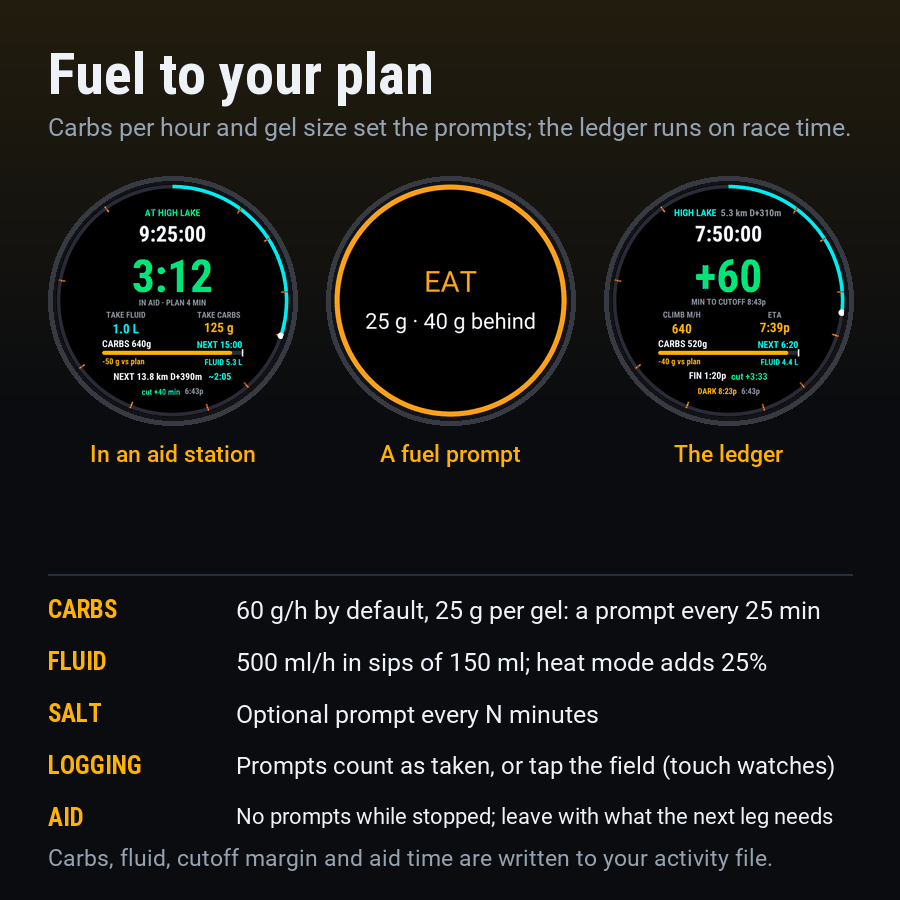
| Carbs per hour | 60 g | The only ultra position stand (ISSN) says 30–50 g/h; finishers in field studies eat more, 60–90 g/h with a trained gut. Use what you trained with. |
| Carbs per gel or portion | 25 g | What one prompt means. 25 g at 60 g/h is a prompt every 25 minutes. |
| First fuel | 20 min into the race | Start early; the hole you dig in the first hours is the one you can’t climb out of. |
| Fluid per hour | 500 ml | 450–750 ml/h for most runners, more in heat. Drink to thirst around that: overdrinking, not too little salt, is what causes low sodium. |
| Drink per prompt | 150 ml | A few mouthfuls; the interval follows from your fluid per hour. |
| Salt every | Off | Minutes between electrolyte prompts, if you take capsules. |
| Fuel logging | Prompts count as taken | Or tap the field on touch watches that pass taps to fields; untapped prompts repeat. |
| Heat mode | Off | Fluid +25% (capped at 1 L/h), carbs −15%. |
The plan code
The planner writes it; you can also write it by hand. One station per |, up to six fields separated by
commas: name,km from the start,climb from the start in m,cutoff,planned arrival,planned stop. Only the
name and the distance are required, and the finish comes last.
Pine Ridge,16.4,1150,9:40,+2:40|High Lake,48.3,2760,15:50,+8:30|Finish,161,5600,+30:00,+28:30
Ridge Camp,97.6,4300,+31:00,+25:00,1:30|Lodge Camp,170.4,7100,D3 14:00,+45:30,2:30|Finish,321.9,11800,+105:00,+91:00
- Cutoffs and arrivals:
15:50is a clock time,+9:50is from the gun. Clock times run in order, so a cutoff at03:30after one at22:00is the next morning. For cutoffs more than a day apart (200-milers often have them only at sleep stations), give the race day:D3 14:00is 14:00 on the third day, day 1 being the start day. - Planned stop: minutes (
90) or hours and minutes (2:30), at most 12 hours. Empty uses “Planned minutes at each aid station”. It counts against the cutoffs and the finish, and sets the stop timer and the “MOVE ON” nudge there. - Names: up to 14 characters, no commas or bars. Up to 60 stations, split over eight settings of 250 characters.
- The ready screen counts what it read; “unreadable” there means a station was skipped.
How the numbers are worked out
| Race clock | Time since the gun (the gun time setting) or since you started the activity. |
| Course distance | The watch’s distance, corrected to each station’s official distance when you press LAP there or reach its course point. |
| Effort | Distance + climb × 10: 100 m of climb counts as 1 km. Climb is the watch’s own total ascent, so it matches Garmin’s numbers. |
| Effort rate | 60% your last hour, 40% your race so far, both without time in aid stations. Before 15 minutes: your plan’s pace for the leg, or 7 km/h. |
| ETA | Effort left to the next aid station ÷ rate. Beyond it: slowed by the fade setting, plus your planned minutes at each station between. |
| Cutoff margin | The next station with a cutoff, minus when you’d leave it (the rest of the stop you’re in, the ETA and its planned stop). The finish cutoff is an arrival time. |
| Ahead / behind plan | Your ETA at the next station with a planned arrival, against it. |
| Leave with | The next leg’s ETA × your fluid and carbs per hour, rounded. |
| Battery | The drop over the last hour against the hours to your projected finish. |
Prompts and warnings
- Arrival (LAP or the course point): the station, the margin, the next leg and what to take.
- Cutoff close: once per station when the margin drops under 15 minutes, with a double buzz. Cutoff risk: every 15 minutes while it’s negative.
- Move on: once per aid station, when your planned minutes are up.
- Fuel (EAT, DRINK, SALT): at least 75 seconds apart, never in an aid station.
- HR cap and battery: at most every 10 minutes and every hour.
- Enable ULTRA RACE under the activity’s Alerts › Connect IQ to see them full screen.
If the field gets a smaller slot
In a layout with more than one field, ULTRA RACE shows the margin (or the stop timer) and the next aid station with the race clock. Use the one-field layout for the full view.
The research behind it
Before building ULTRA RACE we read coaching guidance, race rules, sports-nutrition studies, Garmin’s manuals and forums, and the Connect IQ developer documentation. In short:
- Coaches plan ultras as time between checkpoints, because GPS and course distances disagree; runners still carry paper split charts for that reason.
- Most races enforce leave-by cutoffs at aid stations. Margins shrink late: on Western States’ 30-hour pace the buffer is about an hour for most of the race and 22 minutes near the end.
- The second half is slower for almost everyone: 33% across 16,518 finishes at UTMB, CCC and Javelina, 18–22% for elites.
- Garmin’s own ETAs use current pace and ignore elevation; Course Planner cutoffs (2026) count down only near a checkpoint and don’t reach every watch. Connect IQ fields can’t read the course profile, so the plan has to come with the field.
- Fuel targets: 30–50 g/h in the ISSN position stand, more among finishers; 450–750 ml/h of fluid; avoid overdrinking.
General guidance, not medical advice. Sources include the ISSN position stand on ultra-marathon nutrition (2019), Western States Endurance Research, Jason Koop and CTS, David Roche, iRunFar, DC Rainmaker and the Garmin forums.